Categories & custom fields
Group assets and subscriptions the way your business talks about them, then add the fields that category needs, and only that category.
Assignments, maintenance, repairs, warranties, todos, notes, costs and custom events land on one unified timeline. For every asset, person, location and subscription you track.
No credit card required · 14-day free trial · Cancel anytime
Trusted by teams across industries
No separate maintenance log, assignment history, notes app and task list to reconcile. One timeline holds the whole life of the record.
Assignments and reassignments, loans and returns, storage moves, purchases and leases, warranties, condition checks, maintenance, repairs, damage, decommissions, subscription billing and contracts, todos and quick notes.
Add event types the way your business actually works: DOT inspection, calibration, safety check, deep clean. Each has its own fields, icon, color and cost category, limited to the categories they belong to.
A now marker splits the timeline. Above it sit the todos that are due, the warranty that expires and the contract that renews. Below it sits everything that already happened.
Only want the repairs? The assignments? The custom events? Toggle any class of event on or off and the timeline redraws. No report builder required.
Attach receipts, photos, invoices and PDFs directly to any timeline entry. Your team can add comments too, keeping every cost and decision documented, not buried in someone's inbox.
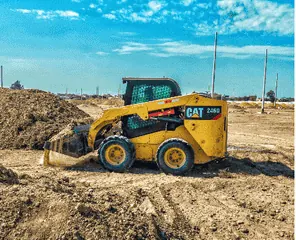
Caterpillar 246D Loader · Asset 32442
No events of that type on this asset.
Every record in AssetCenter shows what it holds right now, and how it got there. Open a person and see their kit; open a location and see what's on it; open a subscription and see who's using the seats.
Categories you define, custom fields that match your paperwork, a photo, a serial number, a scannable tag, and a running total of what it has cost you since the day you bought it.
Each person carries their assigned assets, subscriptions and locations, plus the total value of the kit in their hands. Onboarding and offboarding stop being a guessing game.
Locations have their own type, status and photo, and their own timeline of everything that arrived, left or happened there. Break them down further with sublocations like a room, bay or shelf.
Licenses, seats and recurring cost sit next to your physical assets, assigned to the people, locations and machines that use them, with billing and contract events on the same timeline.
See your assigned to-dos, spending trends, upcoming end of life equipment, upcoming expiring warranties and recent team activity, all from a dashboard you can arrange your way.
AssetCenter ships with the events most businesses need. When you need a custom event, you don't file a feature request. You add the event type yourself, decide which fields it captures, pick its icon and color, and choose which asset categories it applies to.
The timeline is what makes AssetCenter different. This is everything else you get with it.
Group assets and subscriptions the way your business talks about them, then add the fields that category needs, and only that category.
Assign to a person, a location, a sublocation, or all three. Loan an item and return it, move it to storage, hand it to the next crew. Every move is dated and attributed.
Seats, per-license cost, billing frequency, contract terms and auto-renew, assigned to the people, places and assets that consume them.
Attach a task to the asset it belongs to, give it a due date and an owner, and let the assignee get notified. It shows on their dashboard and on the asset's timeline.
Scan a tag with your phone camera and land on the asset. Scan something unknown and create it on the spot with the tag already filled in.
Email reminders for expiring warranties, renewing contracts and end-of-life assets, with a look-ahead window you set: this month, this quarter, this year or two.
Purchase, warranty, repair and maintenance costs roll up per asset and per cost category, with straight-line depreciation and salvage value calculated for you.
Receipts, manuals, warranty cards and inspection photos attach to the event they belong to. Comment threads keep the conversation with the record.
Start from the spreadsheet you already keep. Excel templates for assets, people, locations and subscriptions get you loaded in an afternoon, and your data exports whenever you want it.
Connect your directory and keep your people list current automatically instead of re-typing your org chart every quarter.
Invite your team, set what each person can see and change, and secure the account with two-factor authentication and social sign-in.
Installable on a phone or tablet and built for one-handed use, so the person holding the wrench can log the repair without going back to a desk.
Because every change is already an event on the timeline, the reports are just a different view of what you've been recording all along. Export any of them to Excel.
Book value over time, by asset or across the fleet, with salvage value factored in.
What's approaching the end of its useful life, so replacement is a plan and not a surprise.
Every event across every asset, filtered by type and date range. The audit trail, exportable.
What software and services actually cost you per month, and how that has trended.
A single grid of who and where everything is right now, the fastest answer to "where's the…?"
Your locations geocoded and plotted, with the assets sitting at each one.
No feature gates on the timeline, the custom events or the reports. Plans differ by how much you track and how many people track it. Start with a 14-day free trial.
For growing operations with several locations and a real fleet.
Start 14-day free trialFor multi-location organizations that need everyone in the system.
Start 14-day free trialCompare all plans, limits and billing questions
Every plan includes the unified timeline, unlimited custom event types, all six reports and unlimited people, locations and subscriptions.
Anything with a serial number, a tag or a cost: heavy equipment, vehicles, tools, laptops, phones, AV gear, medical devices, instruments, furniture. Alongside that you track the people who use it, the locations it lives at, and the software subscriptions and licenses that go with it.
Yes, that's the point. Create as many event types as you need, give each one the fields it should capture, choose its icon and color, mark fields required, tie it to a cost category and restrict it to the asset categories it applies to. Your events look and behave exactly like the built-in ones on the timeline.
Download the Excel template for assets, people, locations or subscriptions, paste in what you already keep, and import. Most teams are up and running the same day. You can export your data back out at any time.
Every asset, person, location and subscription shows its current assignments at the top of the record, and the assignment grid report puts the whole picture on one screen. The timeline underneath tells you how it got that way.
It installs to a phone or tablet home screen and is built for one-handed use. Scan a barcode or QR tag with the camera to jump straight to an asset, log a repair, or create the asset on the spot if the tag isn't in the system yet.
Pick the plan that matches how much you track. Plans differ by asset count, seats and storage. Every plan includes the timeline, custom event types and all six reports.
Explore AssetCenter
See how AssetCenter fits different operations, compare it with other platforms, or start with a practical guide.
Explore workflows for agriculture, construction, education, healthcare, IT, and nonprofits.
Explore industries ComparisonsReview direct comparisons and shortlists built around setup, daily use, and total effort.
See comparisons Resource centerLearn about asset registers, equipment checkout, ITAM, barcodes, tags, and rollout planning.
Read the guidesPut your assets, your people, your locations and your subscriptions on one timeline, and know what happened, what it cost and who did it, without asking anyone.
Import from Excel All reports on every plan Export your data anytime