
Snipe-IT vs AssetCenter: How Do They Compare?
Snipe-IT is one of the most well-known open-source IT asset tools. AssetCenter is a modern SaaS built for companies that want simplicity, clarity, and a unified view of everything they own not just laptops and other IT equipment.
Core Philosophy
SnipeIT
Designed primarily for IT equipment tracking (laptops, phones, accessories).
Open-source and self-host friendly.
UI is functional but dated.
Focuses more on check-in/check-out, licenses, and consumables.
AssetCenter
Built for modern SMBs and growing organizations that want to track physical assets + digital subscriptions + people + locations in one place.
Designed for non-technical teams, not just IT.
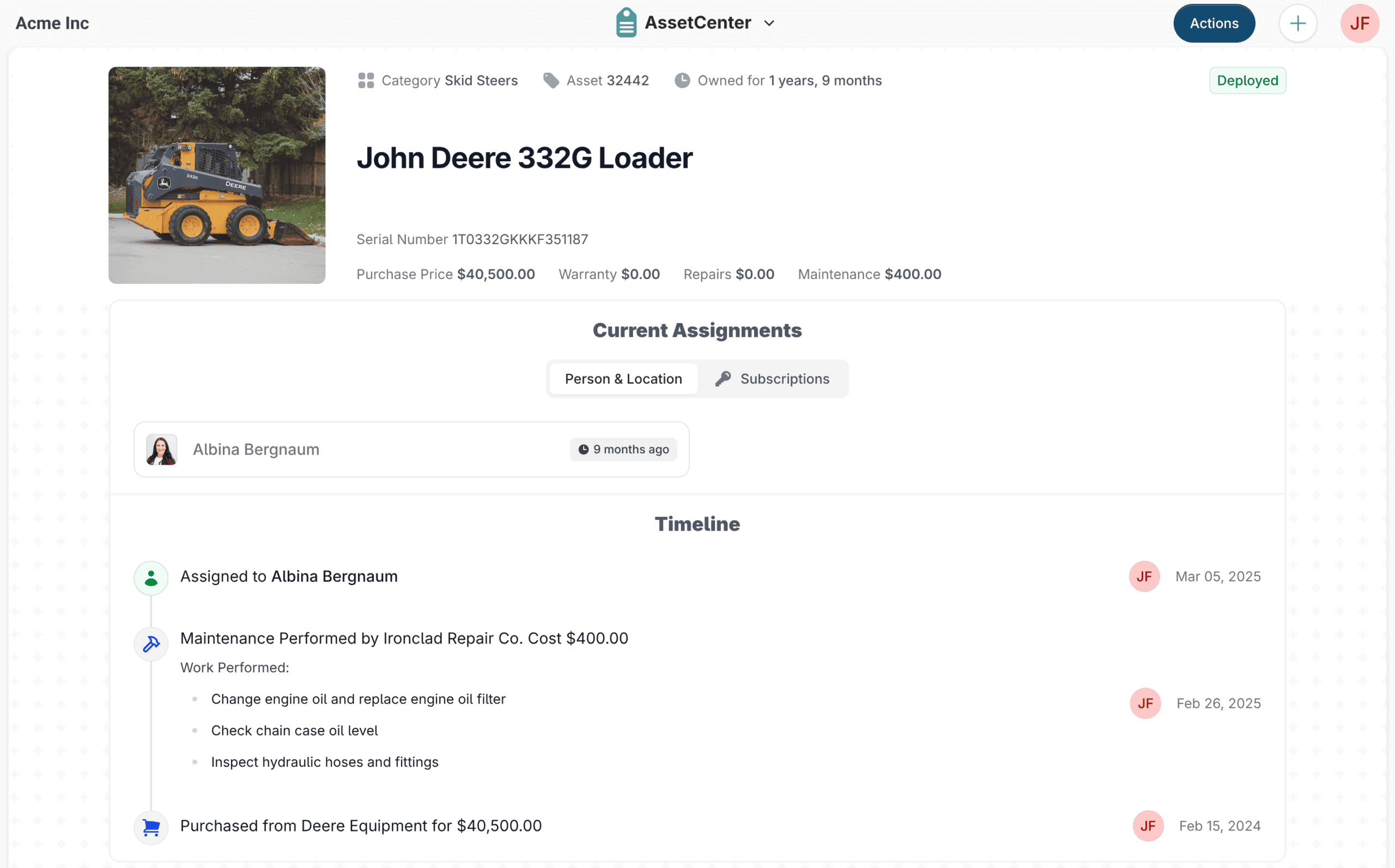
Prioritizes clean UX, automation, and a unified event timeline for every asset.
Asset & Lifecycle Tracking
SnipeIT
Tracks IT hardware and accessories well
Assignment history and status tracking
Limited lifecycle forecasting (end-of-life, renewals handled manually)
AssetCenter
Tracks assets from purchase to retirement
Built-in end-of-life forecasting and warranty expiration
Full event timeline per asset (assignments, maintenance, incidents, storage, returns)
Asset value tracking and documentation attachments
Subscription Management
This is one of the biggest differences.
Snipe-IT: No native subscription tracking
AssetCenter.app: Built-in subscription tracking with renewals, cost reporting, and alerts
For teams managing SaaS tools, cloud services, or recurring vendor contracts, AssetCenter.app eliminates the need for spreadsheets or separate systems.
People & Locations
SnipeIT
Assign assets to users
Limited location and organizational modeling
AssetCenter
Dedicated people and location entities
Supports storage locations, sub-locations, loan periods, and due dates
Designed for shared assets, rotating equipment, and distributed teams
Customization & Flexibility
SnipeIT
Supports custom fields
Configuration is functional but more technical
AssetCenter
Category-based custom fields
Drag-and-drop field ordering
Fields dynamically render based on asset type
Designed for non-technical administrators
User Experience
SnipeIT
Practical and functional interface
UI reflects its open-source roots
Best suited for IT teams comfortable with dense forms
AssetCenter
Clean, modern UI
Consistent layouts and dashboards
Built for IT, operations, finance, and leadership to all use the same system comfortably
Hosting & Maintenance
SnipeIT
Self-hosted (free, but requires setup and maintenance)
Hosted option available
You manage updates, backups, and email configuration
AssetCenter
Fully managed SaaS
Automatic updates and backups
No servers or infrastructure to maintain
Pricing Approach
SnipeIT
Free if self-hosted (with time and infrastructure costs)
Hosted versions available at a cost
AssetCenter
Asset-based pricing
People, locations, and subscriptions included
Predictable pricing as teams grow
Which Should You Choose?
Choose Snipe-IT if you:
Want an open-source IT asset tracker
Are comfortable self-hosting and maintaining servers
Primarily track laptops, phones, and accessories
Prefer a free or developer-managed solution
Choose AssetCenter if you:
Want a modern, all-in-one asset and subscription platform
Need visibility into lifecycle, renewals, and costs
Want a system non-technical teams will actually use
Prefer a fully managed SaaS with no maintenance overhead
Summary
SnipeIT
Snipe-IT is primarily an IT asset management system. It focuses on tracking laptops, phones, accessories, and software licenses, with strong support for check-in / check-out workflows.
It’s especially popular with technical teams who prefer open-source tools and are comfortable managing their own infrastructure.
AssetCenter
AssetCenter.app is designed for modern organizations that want a broader view of everything they own—equipment, tools, subscriptions, people, and locations—without needing technical expertise to manage the system.
It’s built as a fully managed SaaS with a strong focus on usability, automation, and lifecycle visibility.
